Backups and recovery
Repositories, the three kinds of backup, the window between them, proving a backup restores, and putting one back.
A backup nobody has restored is a belief, not a backup. QuorumKit is built around that distinction: a chain is labelled unverified until a restore drill has actually rebuilt it and asked it questions, and the recovery-point readout is measured from the archive rather than from the last job that reported success.
This page is the whole subsystem. Backups is a section of every deployment.
Is it protected right now
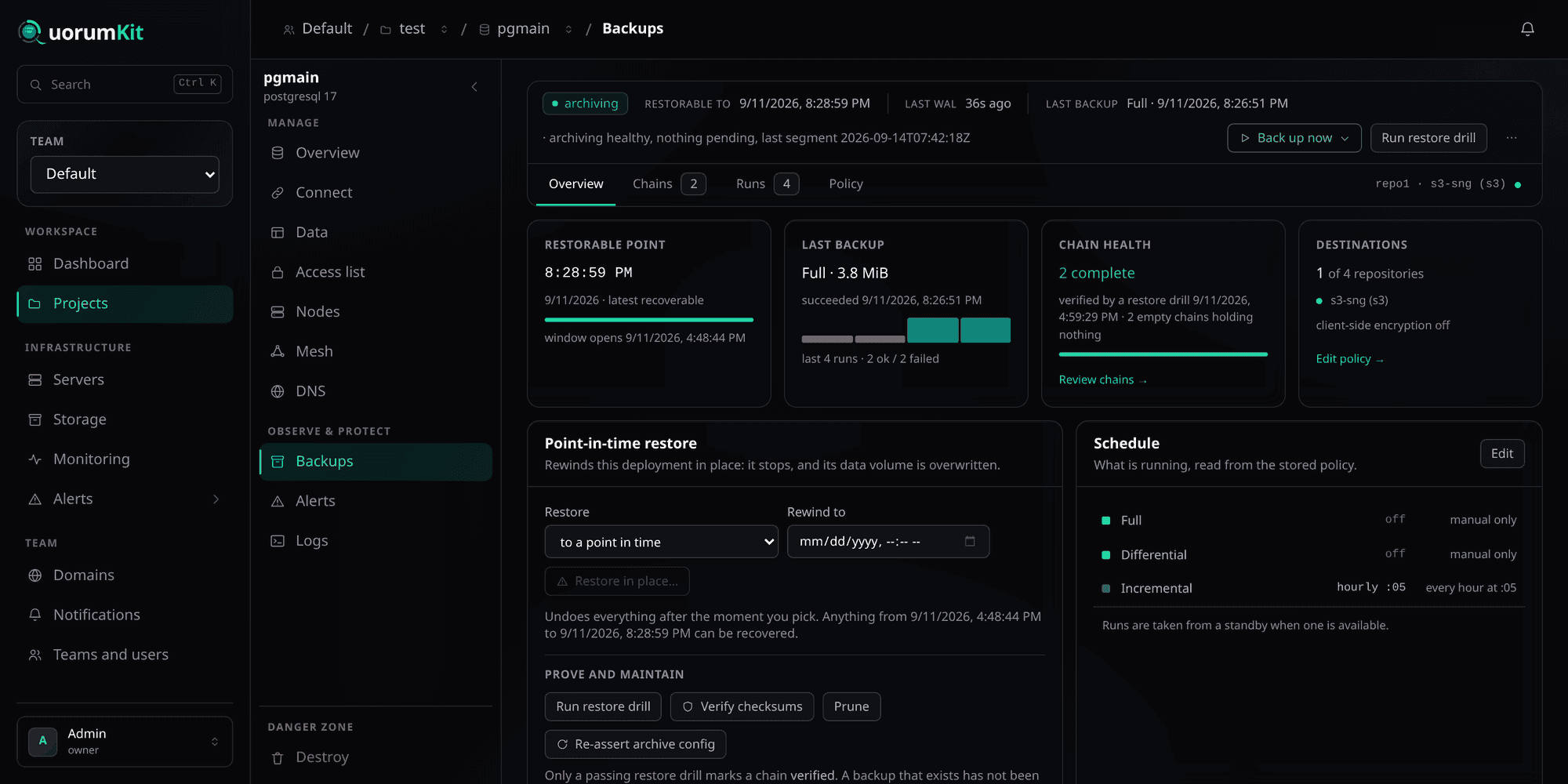
- 1The only line that answers the question — Archiving state, how far forward you can recover to, how long ago the last log segment arrived, and the last backup. Read from the archive itself — not from whether a job reported success.
- 2Putting it back — In place, over the running deployment. It stops, its data volume is overwritten, and it recovers to the point you name.
- 3Re-assert archive config — Archive settings live in the cluster's own config store, not in a rendered file, so an ordinary plan sees no difference and cannot reach them. This builds a plan that pushes them again.
- 4What runs without you — Read back from the stored policy, so it is what is actually scheduled rather than what was typed into a form once.
Archiving healthy and backups succeeding are two different claims, and the strip makes both. A deployment can take a perfect backup every night and still lose a day, because what fills the space between backups is the continuous log — and that is what the archive state is about.
Where backups go
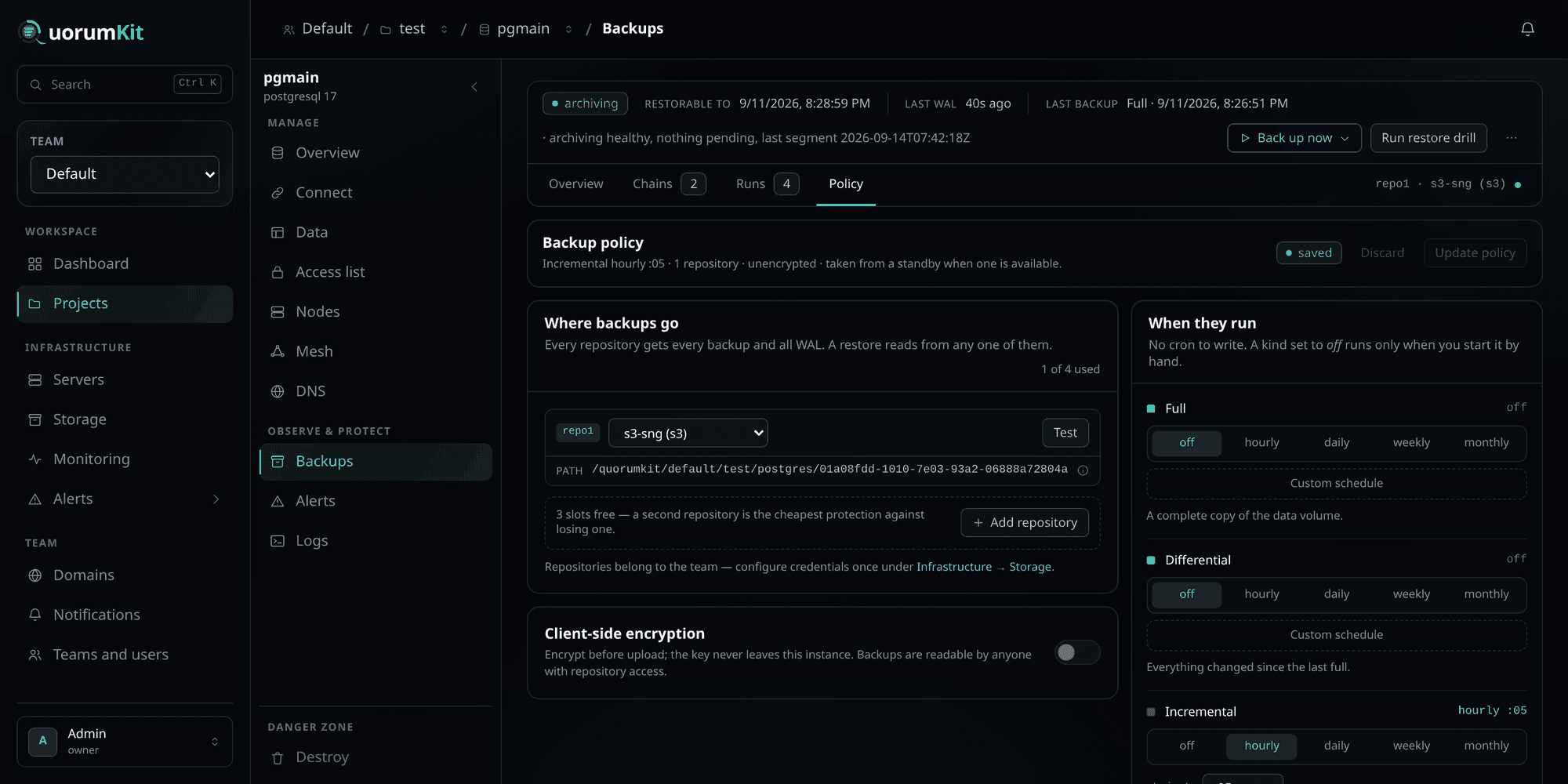
- 1Up to four repositories — Every repository gets every backup and all WAL, and a restore can read from any one of them. A second repository is the cheapest protection there is against losing the first.
- 2Client-side encryption — Encrypted before upload, so the object store never holds plaintext. Off by default, and it cannot be turned on for a repository that already holds backups.
- 3No cron to write — Each kind is off, hourly, daily, weekly or monthly — or a custom cadence built from dropdowns. Off means the kind exists and only runs when you start it.
A repository is either local — a volume on the node itself — or S3, meaning any S3-compatible object store. Both are first-class, and a policy can hold up to four of them at once.
A local repository cannot back up a deployment with more than one member. The volume lives on the machine that wrote it, so the other members' backups would land somewhere that cannot restore them. QuorumKit refuses that combination rather than producing backups with a hole in them.
The path is frozen
Each repository's prefix is fixed when the policy is created and never recomputed. Renaming the project, the deployment or the storage record does not move anything, because a repository that relocates when something is renamed is a repository you cannot restore from after a rename.
Test connection tests what the backup tools do
Test does not just check that the endpoint answers. It also asks for the bucket the way pgBackRest and xbcloud ask for it — unsigned, following no redirects — because those tools do not follow redirects and an SDK does.
The one that catches people: an AWS bucket is served only from its own region's endpoint. Point a policy
at s3.amazonaws.com for a bucket in ap-southeast-1 and AWS answers 301, every SDK quietly follows it,
and every backup fails with [039]: HTTP request failed with 301 or Probe failed. Test names the endpoint
that would work — s3.ap-southeast-1.amazonaws.com.
Client-side encryption
Available for PostgreSQL. The repository is encrypted with a passphrase QuorumKit generates and seals; the object store holds ciphertext and nothing else.
Two things follow from it, and both are permanent:
- The passphrase cannot be changed while the repository holds backups. Changing it would leave everything already written unreadable, so the existing key is reused for the life of the repository.
- Losing it loses the backups. There is no recovery path that does not involve the key.
MySQL has no client-side encryption, and MongoDB's tooling has none either — for those, encryption is the object store's own (SSE, and a bucket policy that requires it).
Where runs are taken from
from standby decides which member does the reading: required refuses to run if no standby is available,
preferred takes one when there is one, primary-ok does not mind. A standalone deployment has one
member and the setting does not apply.
The three kinds
Each one grows. A restore reads two artifacts, whichever differential you pick.
Each one is small. A restore reads the whole run, and a single missing artifact breaks every backup after it.
| What it copies | Restore reads | Good for | |
|---|---|---|---|
| Full | Everything | One artifact | The root of a chain. Everything else hangs off it. |
| Differential | Everything changed since the last full | Two artifacts | A middle ground — bigger than an incremental, cheaper to restore. |
| Incremental | Everything changed since the previous backup, whatever kind it was | The whole run | Frequent, small, cheap. Costs the most to restore. |
A chain is one full backup and everything extending it. A chain is where restorability actually lives: a chain is complete when every artifact it needs is present, and broken when one is missing — at which point every backup after the gap is unrestorable, which is why the chain rather than the backup is the unit the console shows.
A chain is pinned to the member that started it. A differential or an incremental has to extend the chain it belongs to, so it runs where that chain lives. If that member has left the deployment, QuorumKit refuses the run and says to take a full backup — a chain taken against another member's data uploads successfully and cannot be restored.
The window between backups
The dashed span is continuous: WAL for PostgreSQL, binary logs for MySQL, the oplog for MongoDB. Lose it and recovery can only land on the backups themselves.
Each engine fills that span differently:
- PostgreSQL archives WAL continuously, to every configured repository, from whichever node is currently primary.
- MySQL has no continuous archiver of its own, so QuorumKit ships closed binary logs into the repositories on a schedule — the Ship logs run. The interval is what bounds the recovery point.
- MongoDB slices the oplog continuously, which PBM turns into point-in-time recovery.
The recovery point target on the policy is the threshold for the archive-lag alert, not a promise. The readout above it is measured.
Re-assert archive config
PostgreSQL's archive settings are pushed into the cluster's own configuration store rather than written to a file on disk. An ordinary plan compares rendered files, sees no difference, and reports "no changes" — so if those settings ever drift, nothing an operator can do from the plan screen reaches them.
Re-assert archive config exists for that: it builds a plan that pushes the archive settings again. It still goes through approval, and it restarts nothing unless a value actually differs.
Proving a backup restores
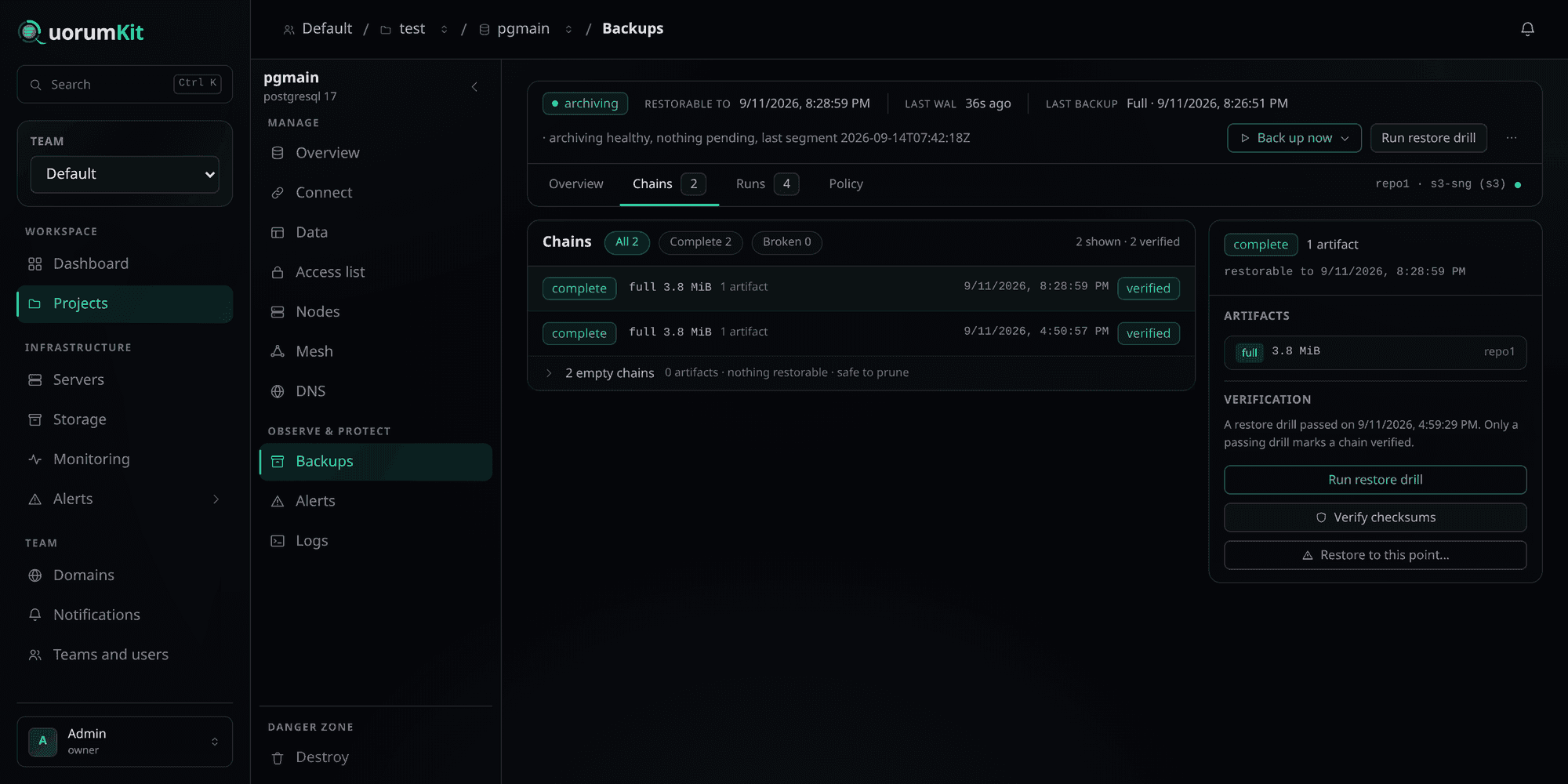
- 1Broken chains are counted separately — A broken chain has a missing artifact, which makes every backup after the gap unrestorable. It is counted here so it cannot be mistaken for a healthy one.
- 2Empty chains — A chain whose artifacts retention has removed. It holds nothing and restores nothing — listed rather than hidden, so the count in the header is not a mystery.
- 3Only a drill marks a chain verified — Not a successful backup, not a checksum walk. A chain is unverified until something has actually rebuilt it from the repository and queried it.
- 4Restore from this chain — Restoring targets a chain and a repository, so you choose which copy to read from when a policy has more than one.
Two different checks, and they answer different questions:
Verify checksums walks the repository and re-checks every artifact against what it recorded. It catches bit rot, a truncated upload, an artifact deleted out from under the policy. It is cheap, and it proves the bytes are intact — not that they reconstitute a database.
Run restore drill actually restores. For PostgreSQL it rebuilds the newest backup into a scratch directory on the node, starts a throwaway server on it, runs smoke queries against it, and tears the whole thing down. Nothing about the live deployment is touched. Only a passing drill marks a chain verified, because it is the only one of the two that has demonstrated the thing the backup is for.
A drill has to find the newest backup, which means listing the repository — and object storage cannot be listed by the tools that write to it. A MySQL deployment backed only by a bucket cannot drill; add a local repository, or restore to a scratch deployment to prove those backups. MongoDB has no drill at all: PBM restores in place, into the cluster its agents belong to, so there is no sandbox to restore into.
Retention and prune
Seventeen artifacts, and the oldest is half a year back. The three counts are independent: raising the daily count does not lengthen the window, it sharpens the near end of it.
Prune applies the policy's retention and deletes what falls outside it. The agent reports which backups it actually removed, and their records go with them — so the list never offers a recovery point whose files were deleted days ago.
Retention removes whole chains, never the middle of one. Deleting an artifact that something else depends on would break the chain rather than shorten it.
Restoring
An in-place restore is destructive: the deployment stops, its data volume is overwritten, and it comes back recovered to the point you named. It is not staged behind a plan — confirming starts it — and confirmation means typing the deployment's name.
Choose which restore you mean. The dropdown offers two, and they are not degrees of the same thing:
- To a point in time — the ordinary one. Rebuilds from the nearest backup at or before your target and replays the log up to it. Everything written after that moment is gone; everything before it comes back.
- Replaying everything — rebuilds from the last backup and applies every archived change on top. This is the repair for a data directory that is corrupt or lost. It undoes nothing: the database ends up where it already is.
That second one is the trap worth naming. "Restore to the latest point" sounds like the safe default and is the one option that cannot recover a mistake — the change you are trying to undo is in the log, and it gets applied again. If you are undoing something, pick a point in time before it happened.
The earliest point you can reach is the end of your oldest surviving full backup — shown as when the window opens. Nothing before that exists to restore from, whatever the log contains.
Reading a run
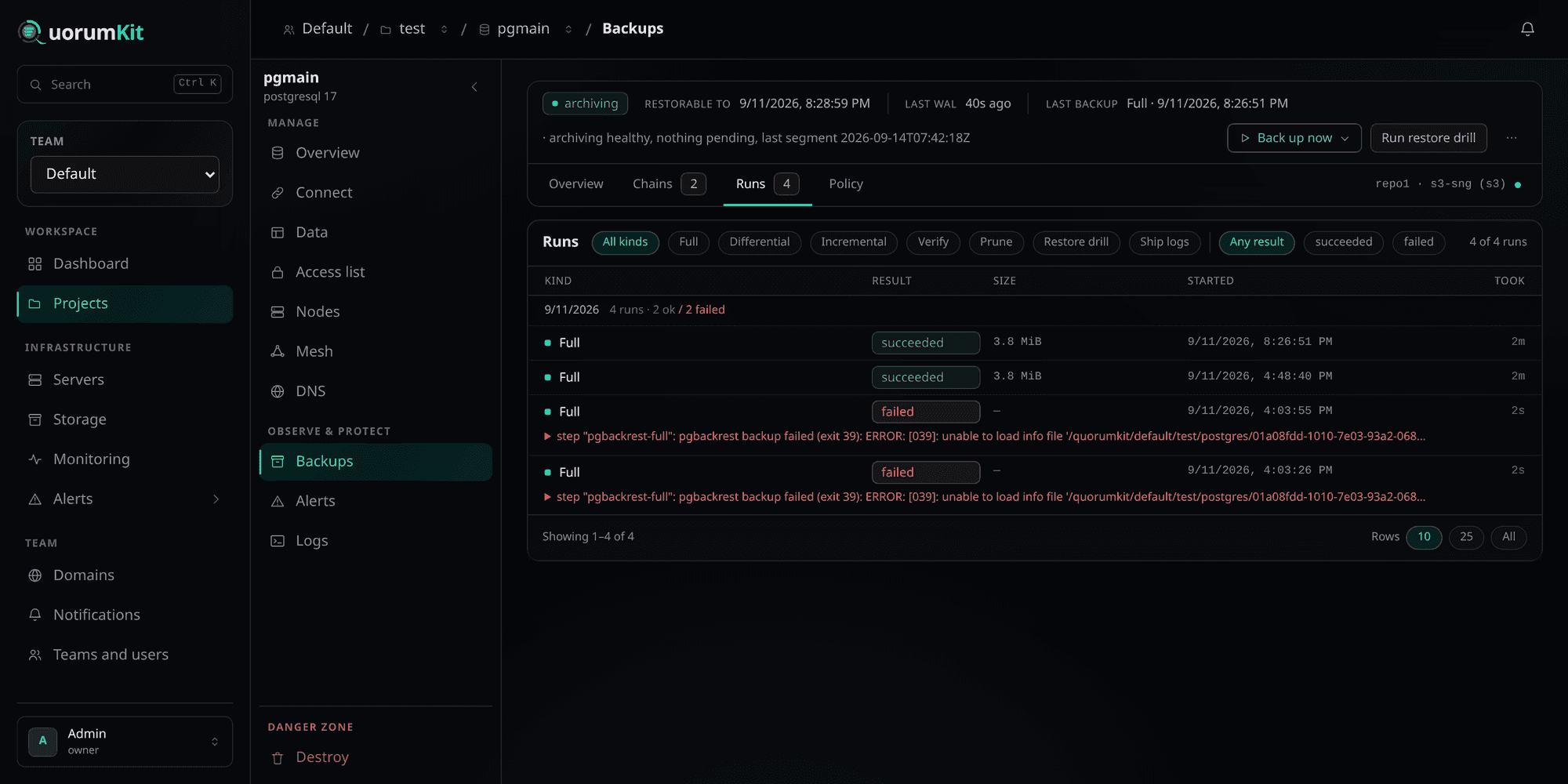
- 1Every kind of run is here — Not only backups: verify, prune, restore drills and — for MySQL — binary-log shipping all appear in the same history, because all of them can fail and all of them matter.
- 2Filter by outcome — A long healthy history makes a single failure easy to miss. This is how you find the failures without reading past the successes.
- 3Grouped by day — With the day's tally beside it, so a bad night reads as a bad night rather than as four unrelated rows.
- 4Why it failed, verbatim — The tool's own error, unedited — here, pgBackRest exit 39 against a bucket its endpoint would not serve. It is the sentence that tells you what to change.
A run that never even started — a schedule refused because the chain it would extend is gone, say — is recorded as a failed run carrying the reason. A schedule being turned away every hour would otherwise look exactly like a schedule that is not running.
What each engine can do
| Full | Differential | Incremental | Verify | Prune | Restore drill | Ship logs | Point-in-time | |
|---|---|---|---|---|---|---|---|---|
| PostgreSQL | ✓ | ✓ | ✓ | ✓ | ✓ | ✓ | archives WAL itself | ✓ |
| MySQL | ✓ | ✓ | ✓ | ✓ | ✓ | local repository only | ✓ | ✓ |
| MongoDB | ✓ | — | ✓ | ✓ | ✓ | — | slices the oplog itself | ✓ |
MongoDB has no differential: its tooling does not have one, and offering a button that always errors is worse than not offering it. Its "full" is the base of an incremental chain rather than a standalone copy, which is what lets incrementals follow it at all.
Getting started
Add a repository. Infrastructure → Storage, then Test it. A repository belongs to the team and can be used by any deployment in it.
Attach a policy. Backups → Policy on the deployment: choose the repository, set the cadences, decide on encryption.
Plan and apply. Attaching a policy writes it down; the apply is what puts archiving and the repository configuration onto the machine. Until then nothing is being archived.
Take a full backup. Everything else extends it, and until one exists there is nothing to restore from.
Run a restore drill. Until one passes, the chain is labelled unverified — and it is right to.