Using the console
A tour of the whole loop — enrol a machine, deploy a database, read the plan, connect to it.
This page is the path through the product once. Each step links to the page that goes deeper.
Signing in
The installer printed the address and a generated password:
Console   http://203.0.113.10:8080
Sign in   admin@localhost / <generated>
Lost it? quorumkit password on the host prints it again — until you change it, at which point it stops
being in .env at all. Change it, then point a domain at the host.
That first account is the owner: the root of the installation rather than a rung on any team's ladder. Some things — outgoing mail, the ACME delegation, the control plane's own version — are only reachable by it, and an admin of every team still cannot open them.
How things are arranged
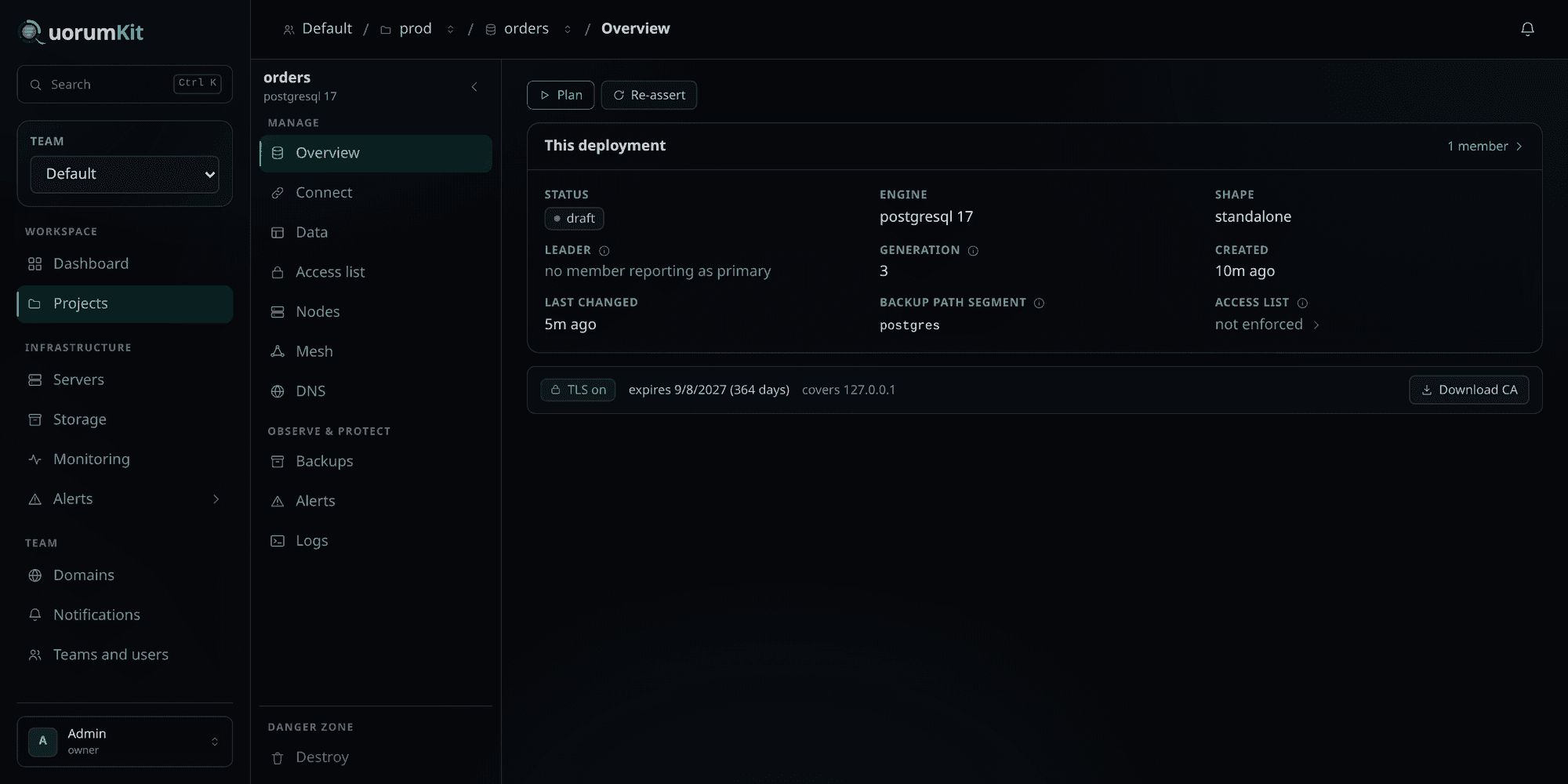
- 1Where you can be — The installation and the team: machines, storage, monitoring, who has access. It follows the team picker above it.
- 2One deployment's own sections — Everything about this database lives here — how to connect, its data, its nodes, its backups. Destroy is at the bottom, on its own.
- 3Team, project, deployment — The trail is also the switcher: each segment opens a picker for its own level.
- 4Nothing happens without this — Plan renders the change. It is the only route to a machine, and it changes nothing by itself.
Two containers, and the distinction is load-bearing rather than organisational:
- A team owns machines and people. Servers are enrolled into a team, and roles are held in a team.
- A project owns deployments and the access to them. Projects isolate: a credential sealed for one project does not open a deployment in another.
The picker at the top of the rail switches team. Everything in the rail follows it, except Settings, which belongs to the installation and does not move.
1. Enrol a machine
Servers → Add server mints a single-use token and prints a one-liner to run as root on the new host. Nothing needs to be open to the internet on that machine — the agent dials out. See adding servers.
Once it reports in, its page shows the host's real facts: cores, memory, disks, kernel, the Docker version, which agent it is running.
Enrol at least three machines before you build anything replicated. A two-node set has no majority — with one node down the remaining one cannot tell "my peer is gone" from "I am the one cut off" — so QuorumKit refuses that shape rather than letting you build something that cannot fail safely.
2. Create a deployment
Clusters → New deployment, inside a project. The dialog asks for the engine, its version, the shape, and which machines:
| Engine | Versions | Shapes |
|---|---|---|
| PostgreSQL | 17, 16 | standalone · replicated (odd number of nodes) |
| MySQL | 8.4 | standalone · group replication |
| MongoDB | 7, 6 | standalone · replica set (3+, never 2) |
one machine
quorum elects the primary
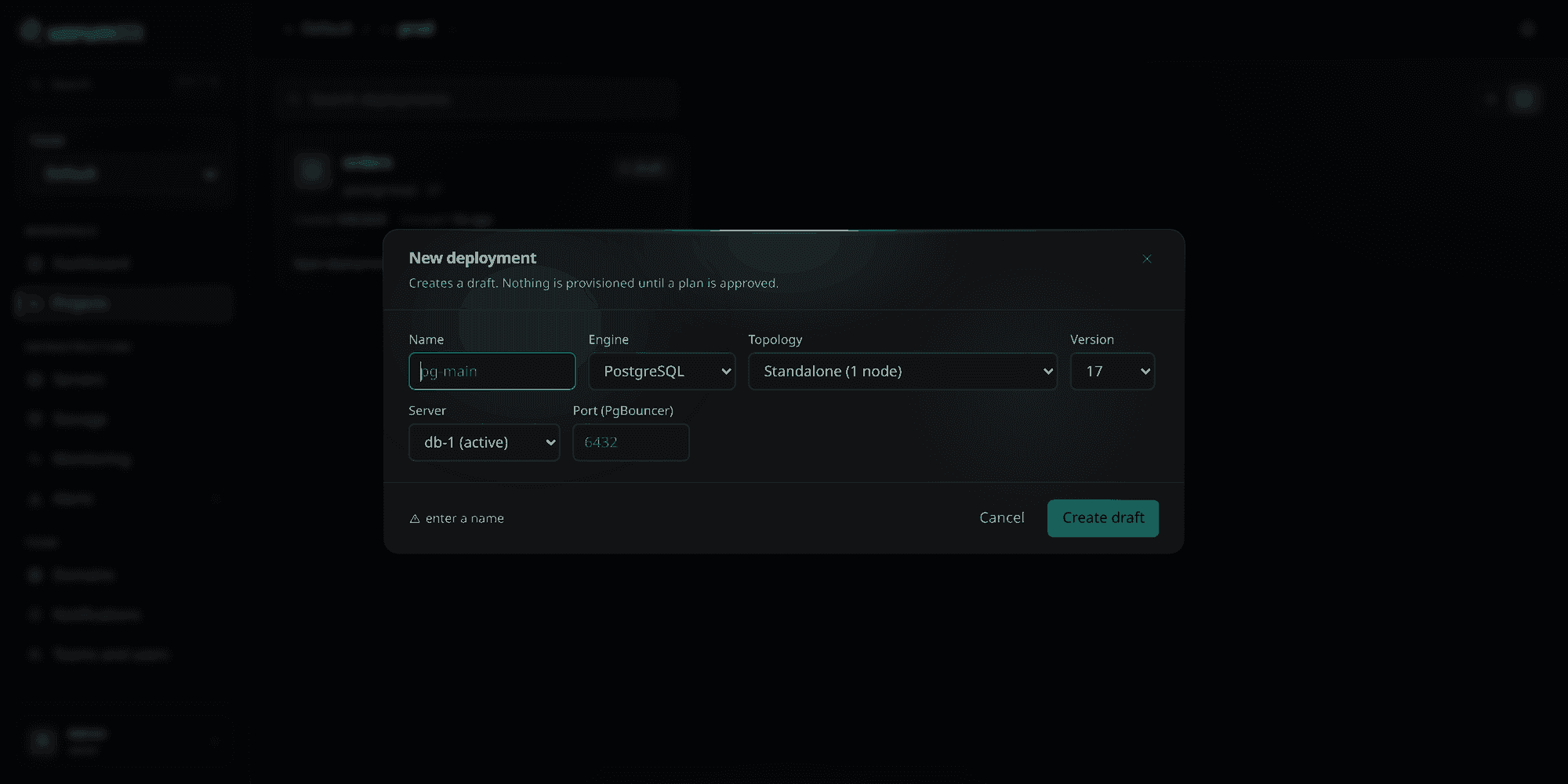
- 1Engine, shape, version — Three choices that decide everything else. The shapes offered are the ones that engine can actually be run in — a two-node MongoDB set is not in the list.
- 2Which machines — Only servers this project can reach. A replicated shape asks for one per node and spreads them across failure domains where it can.
- 3It says so itself — “Creates a draft. Nothing is provisioned until a plan is approved.”
- 4Create draft — Writes desired state and nothing else. The machines are untouched until you approve a plan.
Creating it deploys nothing. It writes a draft desired state, and the machines are untouched.
3. Read the plan
A plan is not a summary — it is the change itself, rendered. The containers with their images and limits, the config files with their contents, the firewall rules, the DNS records, and everything to be destroyed, counted separately and never folded into a total.
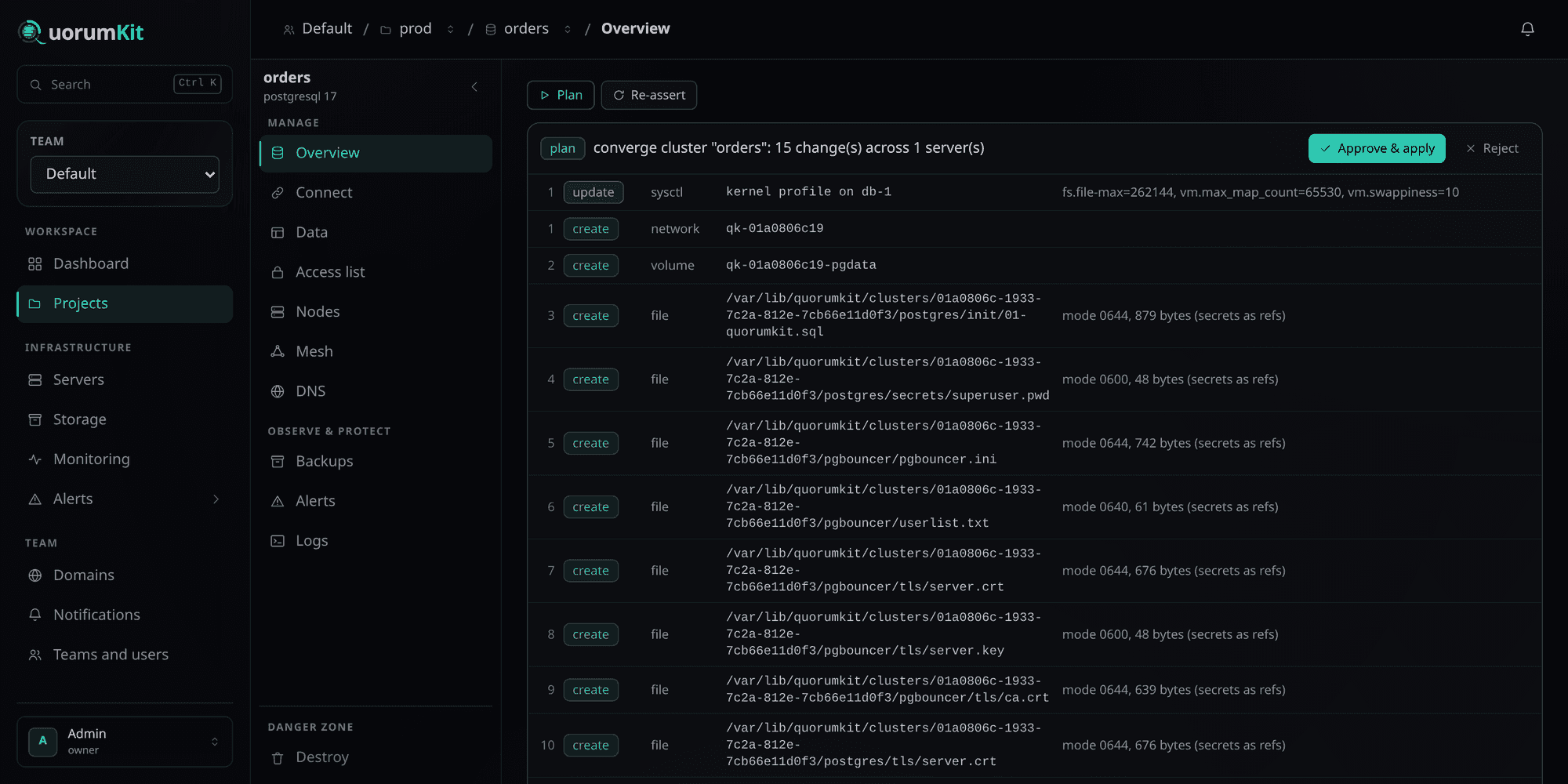
- 1Counted, not summarised — Fifteen changes across one machine. A destroy would be counted separately here, never folded into that total.
- 2What each step does — create, update, destroy — per row, so the shape of the change is readable before any of the detail is.
- 3Down to the file — Every config file by full path, with its mode and size. Secrets appear as references, never as values — the plan is safe to read and to paste.
- 4The only gate — Until this is pressed, nothing has been asked of any machine.
If nothing differs, the plan says no changes. That is an answer, not an error.
Read plan and apply for why nothing in the product skips this — including restores, failovers and destruction.
4. Apply it
Approving runs the plan machine by machine. The console shows the phase running now with that step's own log, and ticks each one off. It can be minimised while it runs and tells you when it finishes; close the tab and it is still there when you come back, because the work belongs to the deployment rather than to your browser.
If a step fails, the run stops there. Nothing rolls forward past an error, and you are told which machine and which command. Re-planning from the resulting state produces a plan that finishes the job.
5. Connect to it
The deployment's Connect tab carries the strings to paste, one per way in, labelled for what each is for — writes, reads, per-instance. The password is revealed on request, and revealing it is audited.
For a replicated deployment the address does not name a member. It names the deployment, and it survives a failover: the primary can move without your connection string changing.
6. Browse the data
The Data tab is a SQL and document console in the browser — tables, columns, indexes, and a query editor.
It does not use the deployment's own credentials. It mints a login per person and per session, carrying exactly the databases that person may open, and drops it when the session goes idle. A viewer gets a read-only role, so the console cannot be used to write by somebody whose role does not permit it.
A brand-new MongoDB deployment has no databases until something writes to one — MongoDB creates a database on first write. The console offers the deployment's own database anyway, and typing a collection name and inserting is what brings it into being.
7. Back it up
Backups covers policy, the schedule, and restore. There is no cron expression to write: the schedule is a builder, and it means the hour you meant in the timezone you meant.
Restores are gated the same way everything else is — a restore renders a plan, including point-in-time recovery, and you approve it before anything is overwritten.
Backups can go to more than one place at once: a local repository and object storage, with the restore source chosen per restore. A deployment spread over several machines must use object storage — a local repository belongs to the machine that wrote it, and a replica cannot restore from a chain it cannot reach.
8. Watch it
Monitoring carries the metrics the control plane already collects; Alerts turns them into rules with contact points. Notifications also land in the bell in the header, and the notifications page answers "what happened" rather than only "what needs attention now".
9. Decide who reaches what
Access is per team, and grants go as narrow as a single deployment:
| Role | What it means |
|---|---|
viewer | Reads what it is granted. A viewer with no grants reaches nothing. |
editor | Changes desired state and approves plans. |
admin | The top of a team: destructive work, and granting access. |
owner is deliberately absent from that ladder — it is the root of the installation, not a rung inside a
team.
10. Keep it current
Agents update themselves to match the control plane; there is nothing to do for them.
The control plane tells you when a newer release exists — Settings → Version — and installs it when you say so. See updating, including the one host-side command an installation older than that feature needs first.